

How I Built LeadPilot: An Automated CRM for Efficient Lead Management
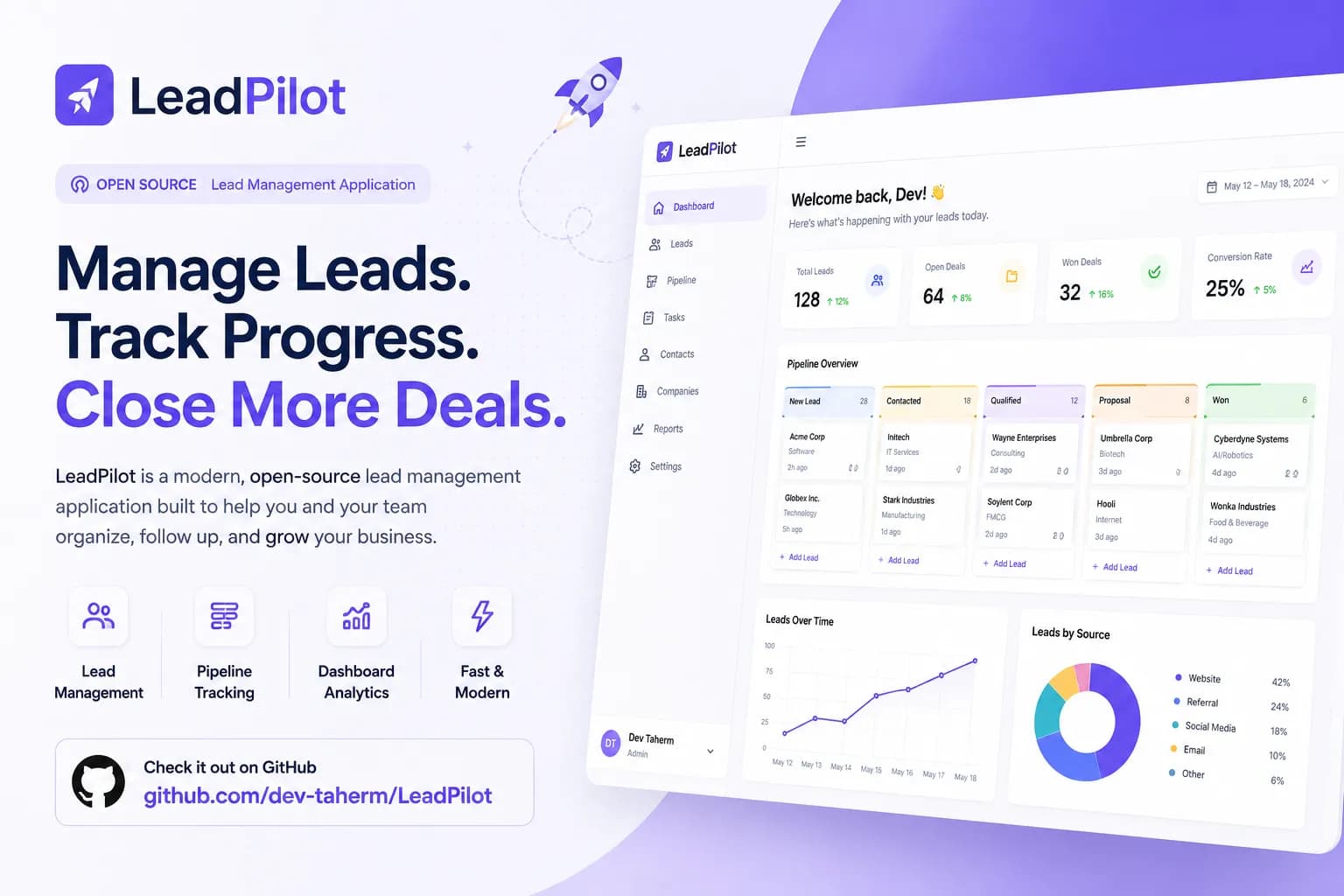
FeaturedLeadPilot is an automated CRM system I built using Django, Celery, and PostgreSQL to streamline lead management, automate nurturing, and provide crucial sales insights.
How I Built LeadPilot: An Automated CRM for Efficient Lead Management
Managing sales leads effectively is a critical challenge for businesses aiming to grow. Manually tracking prospects, updating their status, and ensuring timely follow-ups can quickly become overwhelming, leading to missed opportunities and inefficient workflows. LeadPilot was born out of this very need: to create a robust, automated platform that streamlines lead management from capture to conversion, leveraging the power of modern backend technologies.
My goal with LeadPilot was to develop a system that not only centralizes lead data but also automates crucial tasks like nurturing campaigns, status updates, and reporting. This project showcases how I apply scalable architecture patterns and asynchronous processing to build a practical, high-performance business tool.
The Problem: Fragmented and Manual Lead Management
Before LeadPilot, businesses often struggled with scattered lead data across spreadsheets, emails, and various unintegrated tools. This fragmentation made it nearly impossible to get a clear, real-time overview of the sales pipeline. Furthermore, the manual effort required for lead qualification, follow-ups, and status updates consumed valuable time that could be better spent on direct engagement. This often resulted in:
- Lost Leads: Important follow-ups were missed due to manual oversight.
- Inefficient Workflows: Sales teams spent more time on administrative tasks than on selling.
- Lack of Insights: Difficulty in analyzing lead performance and identifying bottlenecks without integrated data.
The Solution: LeadPilot – Your Automated CRM Companion
LeadPilot provides a comprehensive, centralized platform designed to automate and simplify the entire lead management lifecycle. It acts as an intelligent system that not only stores lead information but also actively helps in nurturing them through various stages. By integrating a powerful backend with asynchronous task processing, LeadPilot ensures that no lead falls through the cracks and every interaction is optimized for conversion.
I engineered LeadPilot to bring structure and automation to lead management, allowing businesses to focus on engaging with prospects rather than managing data. From capturing new leads to scheduling automated follow-up emails and generating performance reports, LeadPilot provides the tools necessary to efficiently convert prospects into loyal customers.
Key Features and Functionalities
LeadPilot is packed with features designed to empower sales and marketing teams:
- Centralized Lead Database: Securely store and manage all lead information in one place, accessible by authorized personnel. Each lead's history, interactions, and status are meticulously tracked.
- Automated Lead Nurturing: Configure automated email sequences and follow-up tasks based on lead status, engagement, or predefined triggers. This ensures consistent communication without manual intervention.
- Customizable Lead Stages: Define and customize lead lifecycle stages (e.g., New, Qualified, Contacted, Proposal Sent, Converted) to match specific business processes.
- Real-time Analytics & Reporting: Gain valuable insights into lead performance, conversion rates, and sales pipeline health through intuitive dashboards and customizable reports.
- User and Role Management: Secure access control, allowing different team members to have appropriate permissions based on their roles.
- RESTful API: A robust API that allows seamless integration with other marketing tools, CRM systems, or custom applications.
Technology Stack: The Backbone of LeadPilot
Building a scalable and reliable lead management system required a careful selection of modern, powerful technologies. I opted for a combination that delivers both performance and flexibility:
- Backend Framework: Django 5.1 and Django REST Framework (DRF) for building a robust and secure API. Django's "batteries included" approach accelerates development, while DRF provides excellent tools for RESTful service creation.
- Asynchronous Task Queue: Celery 5.3 for handling long-running processes like sending automated emails, generating reports, or scheduling follow-ups without blocking the main application thread. This ensures a highly responsive user experience.
- Message Broker: Redis 7.2 serves as the message broker for Celery, facilitating efficient communication between the Django application and Celery workers.
- Database: PostgreSQL 16 as the primary relational database, known for its reliability, data integrity, and advanced querying capabilities for complex lead data.
- Containerization: Docker for packaging the application and its dependencies, ensuring consistent environments across development, testing, and production.
- Deployment: Tools like Docker Compose for orchestrating multi-container applications, simplifying deployment.
This stack, particularly the combination of Django and Celery, is central to how I build scalable backend applications. For more on my approach to building robust Django systems, you might find "How I Build Scalable Django Applications" insightful.
System Architecture: A Microservice-Inspired Approach
LeadPilot employs an architecture that, while not strictly microservices, adopts principles of separation of concerns and asynchronous processing to achieve scalability and resilience.
- Django API (Core Service): The primary service handles all user requests, authentication, data validation, and database interactions. It exposes a RESTful API for both internal and external integrations.
- Celery Workers (Asynchronous Processing): Dedicated Celery workers run in separate processes, constantly monitoring Redis for new tasks. These workers execute all background jobs, ensuring that the main API remains fast and responsive.
- Redis (Broker & Cache): Redis acts as the central message queue for Celery tasks and can also serve as a high-speed cache for frequently accessed data, reducing database load.
- PostgreSQL (Data Persistence): The robust database stores all lead information, user data, and system configurations.
This decoupled architecture allows different components to scale independently. For example, if email volume increases, I can simply add more Celery workers without affecting the performance of the Django API. This is a common pattern I use when developing applications that require high throughput and reliability.
A Deep Dive into Lead Automation: Celery in Action
One of LeadPilot's core strengths is its ability to automate lead nurturing sequences. This is primarily powered by Celery. Here’s a simplified example of how an automated email follow-up task is defined and triggered:
# In tasks.py within a Django app
from celery import shared_task
from django.core.mail import send_mail
from .models import Lead

@shared_task
def send_follow_up_email(lead_id, subject, message):
    """
    Sends a follow-up email to a specific lead.
    """
    try:
        lead = Lead.objects.get(id=lead_id)
        send_mail(
            subject,
            message,
            'noreply@leadpilot.com',
            [lead.email],
            fail_silently=False,
        )
        # Optionally update lead status or log interaction
        lead.last_contacted = timezone.now()
        lead.save()
        print(f"Follow-up email sent to {lead.email} successfully.")
    except Lead.DoesNotExist:
        print(f"Lead with ID {lead_id} not found.")
    except Exception as e:
        print(f"Error sending email to lead {lead_id}: {e}")

# How to trigger this task from a Django view or service:
# from .tasks import send_follow_up_email
# from datetime import timedelta
#
# def schedule_lead_follow_up(lead):
#     # Schedule an email to be sent 24 hours later
#     send_follow_up_email.apply_async(
#         args=[lead.id, "Checking In", "Hope you're doing well..."],
#         eta=timezone.now() + timedelta(days=1)
#     )
In this snippet, send_follow_up_email is a Celery task that takes a lead_id, subject, and message. When a new lead is created or moves to a specific stage, the schedule_lead_follow_up function can be called. Instead of sending the email immediately (which would block the web request), it dispatches the task to Celery. Celery then queues this task in Redis, and a worker picks it up and executes it in the background, ensuring a smooth user experience on the frontend. This pattern is fundamental to building responsive and efficient backend systems.
Challenges and Lessons Learned
Developing LeadPilot presented several interesting challenges that deepened my understanding of distributed systems and backend optimization:
- Ensuring Task Idempotence: Designing Celery tasks to be idempotent (meaning they can be run multiple times without changing the result beyond the initial application) was crucial, especially for tasks like sending emails. I learned to implement checks to prevent duplicate actions.
- Robust Error Handling: Implementing comprehensive error handling and retry mechanisms for Celery tasks was vital for reliability. What happens if an email service goes down? Celery's retry logic and dead-letter queues became essential.
- Database Performance with High Concurrency: Optimizing PostgreSQL queries and indexing strategy was key to maintaining performance as the lead database grew. I focused on profiling queries and using
select_related/prefetch_relatedeffectively in Django. - Securing the API: Beyond basic authentication, I implemented robust permission systems using Django REST Framework's built-in features to ensure that users only access data they are authorized to see.
- Dockerizing for Production: Setting up a production-ready Docker Compose configuration that handles multiple services (Django, Celery, Redis, PostgreSQL) with proper environment variables and persistent volumes was a significant learning curve. It reinforced the importance of environment consistency.
These experiences reinforce my philosophy of building resilient and maintainable systems, where every component is designed with failure scenarios and scalability in mind.
Conclusion: Empowering Businesses with Intelligent Automation
LeadPilot is more than just a project; it's a testament to how intelligent automation and a well-architected backend can solve real-world business problems. By centralizing data, automating repetitive tasks, and providing actionable insights, LeadPilot empowers sales teams to be more productive and focus on what they do best: building relationships and closing deals.
This project further solidified my expertise in building complex, scalable applications with Django, DRF, Celery, and PostgreSQL. It demonstrates my commitment to developing solutions that are not only technically sound but also deliver tangible value to users. I continue to refine and improve LeadPilot, exploring integrations with AI-powered lead scoring and advanced analytics to make it an even more indispensable tool for businesses.
FAQ
Q: What problem does LeadPilot specifically solve for businesses?
A: LeadPilot solves the problem of fragmented lead data, manual follow-up processes, and lack of clear insights into the sales pipeline. It centralizes lead information and automates nurturing tasks, helping businesses manage leads more efficiently and increase conversion rates.
Q: Why did you choose Django and Celery for this project?
A: I chose Django for its rapid development capabilities, built-in security features, and robust ORM, which makes managing complex data models straightforward. Celery was chosen to handle asynchronous tasks like sending emails and generating reports, preventing the main application from being blocked and ensuring a highly responsive user experience. This combination is ideal for scalable backend applications.
Q: Can LeadPilot integrate with other sales or marketing tools?
A: Yes, LeadPilot is built with a RESTful API, making it highly extensible and capable of integrating with other sales, marketing, or CRM systems. This allows businesses to connect LeadPilot with their existing ecosystem for seamless data flow.
Q: How does LeadPilot ensure data security for sensitive lead information?
A: LeadPilot uses Django's robust security features, including secure authentication and authorization mechanisms, SQL injection protection, and cross-site scripting (XSS) prevention. All data is stored in a PostgreSQL database, known for its strong data integrity and security features. Additionally, access control is implemented to ensure users only view data relevant to their roles.
Q: What kind of metrics or insights can LeadPilot provide?
A: LeadPilot can provide various insights, including lead source performance, conversion rates across different stages, sales pipeline health, lead engagement metrics (e.g., email open rates), and team performance. Its reporting features allow for customizable dashboards to visualize key performance indicators.